Clean Candidate Structures Before DFT
Use this workflow for a large candidate pool generated by Make Dataset. The goal is not to create final training labels locally. It is to remove structures that clearly do not justify a DFT calculation, avoiding wasted compute on invalid or redundant configurations.
A robust sequence is:
::
Step 1: Start from trusted structures
Prepare a trusted set of starting structures, typically from an existing training set, relaxed crystals, surface or defect models, or manually constructed prototypes.
In Make Dataset, use Open in the top toolbar to import these structures before adding generation cards.
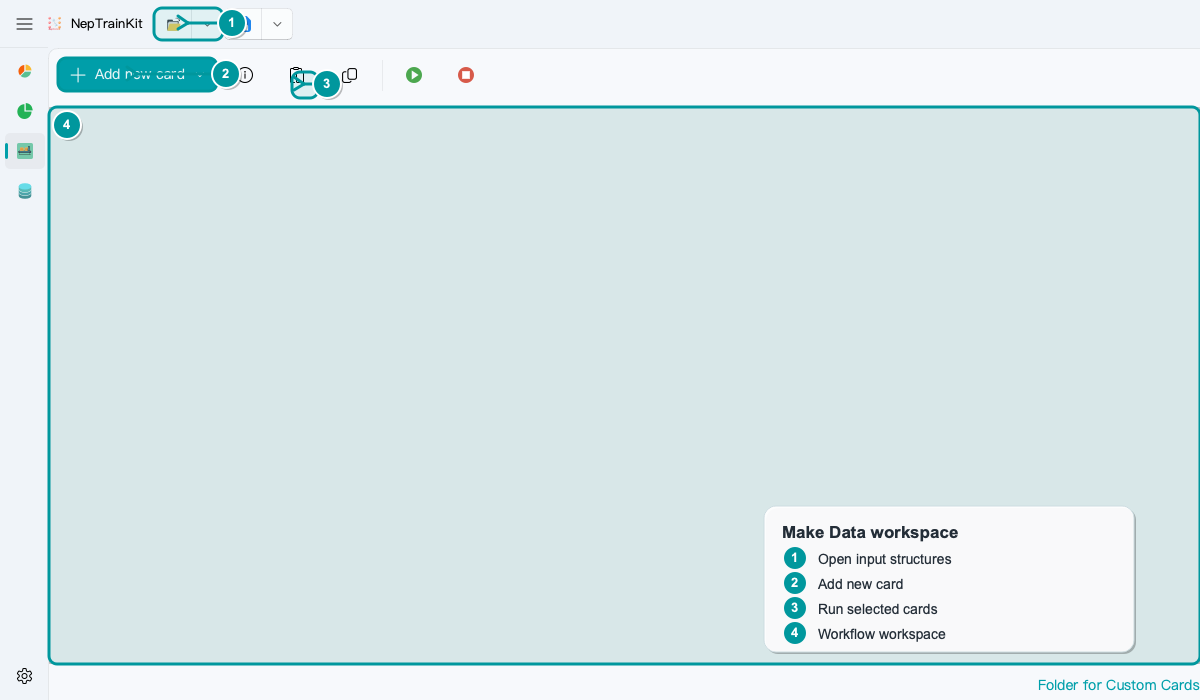
Do not skip this step. Most configuration cards have no object to process without an input structure. Even when a generator can start from scratch, independently verify that its output represents the material system under study.
Step 2: Generate candidates before scheduling DFT
Make Dataset expands the starting structures into a candidate pool. For example:
Lattice Strain/Shear Strain: add structures along strain coordinates.Atomic Perturb/Vibration Perturb: add near-equilibrium displacements.Random Vacancy/Vacancy Defect/Insert Defect: add defect environments.Random Slab/Stacking Fault: add surfaces and stacking faults.Random Doping/Random Occupancy: vary alloy composition or site occupation.
These operations improve coverage but can also create invalid structures: excessive perturbations may place atoms too close, random occupation may create extreme local environments, and surfaces or defects may have unreasonable coordination. Export the candidates to an intermediate file such as candidate_pool.xyz before cleaning them.
Step 3: Inspect structures in NEP Dataset Display
Import candidate_pool.xyz into NEP Dataset Display and begin with visual and geometric checks:
Look for visibly fragmented or overlapping structures.
Confirm that elemental compositions are expected.
Confirm that
Config_typeidentifies the generation source.Look for clearly short interatomic distances or nonphysical local environments.
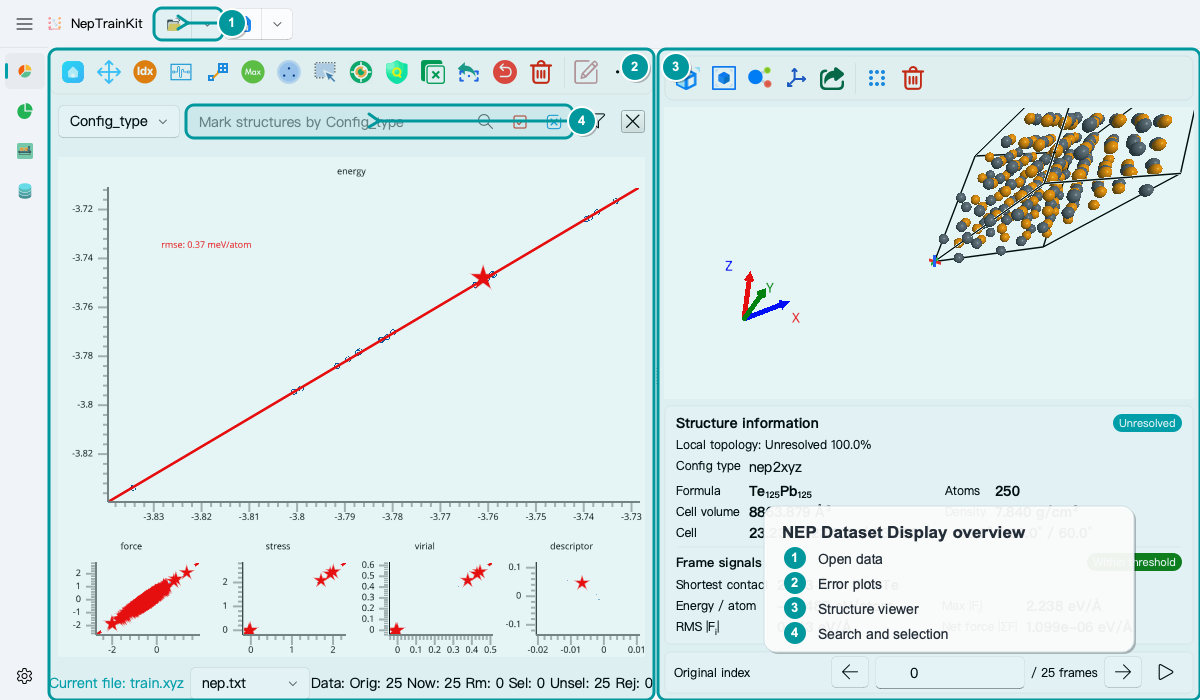
Start with these tools:
Finding non-physical structures: quickly flag suspicious configurations by nearest-neighbor distance.Select by Range: select outliers in a plotted range.Find Max Error Point: locate the most extreme samples when reference or prediction results are available.Search box: isolate a structure family by
Config_type, element, or expression.Delete Selected Items/Undo Delete: remove structures or restore the last deletion.
Step 4: Prescreen with NEP predictions
If a suitable prescreening model is available, use NEP Dataset Display to predict the candidate pool. These predictions are neither DFT labels nor training ground truth. They serve only to reveal clearly implausible candidates.
Useful warning signs include:
A structure with predicted forces far above the rest of the batch likely contains atoms that are too close or another extreme local environment.
An isolated long tail in the energy distribution should be inspected in the structure view.
A systematic anomaly within one
Config_typemay indicate overly aggressive parameters in the upstream card.
Without a trustworthy prescreening model, do not force a decision from predictions. Use geometric checks and manual spot checks, then conservatively narrow the generation parameters.
Step 5: Clean before applying FPS
FPS Filter selects representative structures from a candidate pool; it does not judge physical plausibility.
Applying FPS directly to a contaminated pool is risky. Invalid structures are often far from normal samples in descriptor space and may therefore be selected first. The result appears diverse while spending the DFT budget on structures that should have been rejected.
Use this order instead:
::
Name the cleaned output candidate_pool_clean.xyz and a subsequent FPS result candidate_pool_fps.xyz so every stage remains traceable.
Step 6: Review again after DFT
After DFT labeling, import the structures with energies, forces, and stresses back into NEP Dataset Display. The review now shifts to:
Unconverged DFT calculations or anomalous labels.
Unreasonable long tails in force or energy distributions.
Overrepresented or underrepresented configuration families.
The structures on which the trained model has its largest errors.
This review determines the next Make Dataset iteration: add a defect family, fill a strain interval, or narrow the parameter range of an overly aggressive generator.
Common mistakes
Mistake 1: Run DFT immediately after generation. Candidates are not a finished training set. Cleaning first usually costs less than diagnosing failed DFT calculations later.
Mistake 2: Apply FPS before cleaning. FPS measures descriptor distance, not physical plausibility. An invalid structure may be selected precisely because it is unusually different.
Mistake 3: Treat NEP predictions as DFT labels. NEP predictions are suitable for prescreening and ranking; final training labels still come from DFT.
Mistake 4: Judge only by total count. A pool of 5,000 structures does not guarantee useful coverage. The quality and diversity within each Config_type matter more.